
Claude can scan news every hour and find potential beneficiaries held by Trump & Congress. Here's how (+ prompt)
Adding data connectors to Claude now takes a single click, so this is an updated version of our guide to analyzing Trump's trades with Claude. It shows how to ask plain-English questions about Trump's and Congress's holdings, and how to get an hourly news tracker that tells you which politicians hold the stocks in each story.
1/3: Getting started
- A Claude subscription: Any paid Claude plan works, including for scheduled tasks. I find Claude the best at data analysis, but any AI tool that supports MCP connectors works. See the setup guide for ChatGPT, Perplexity, Grok and others.
- A data connector: You need a connector for political (Trump, U.S. government, Congress) and corporate insider trading data. The InsiderCat connector gives Claude live portfolios, recent trades and delay-adjusted returns.
- No technical setup: Adding the connector to Claude takes one click, and it works on mobile too.
2/3: What you can do
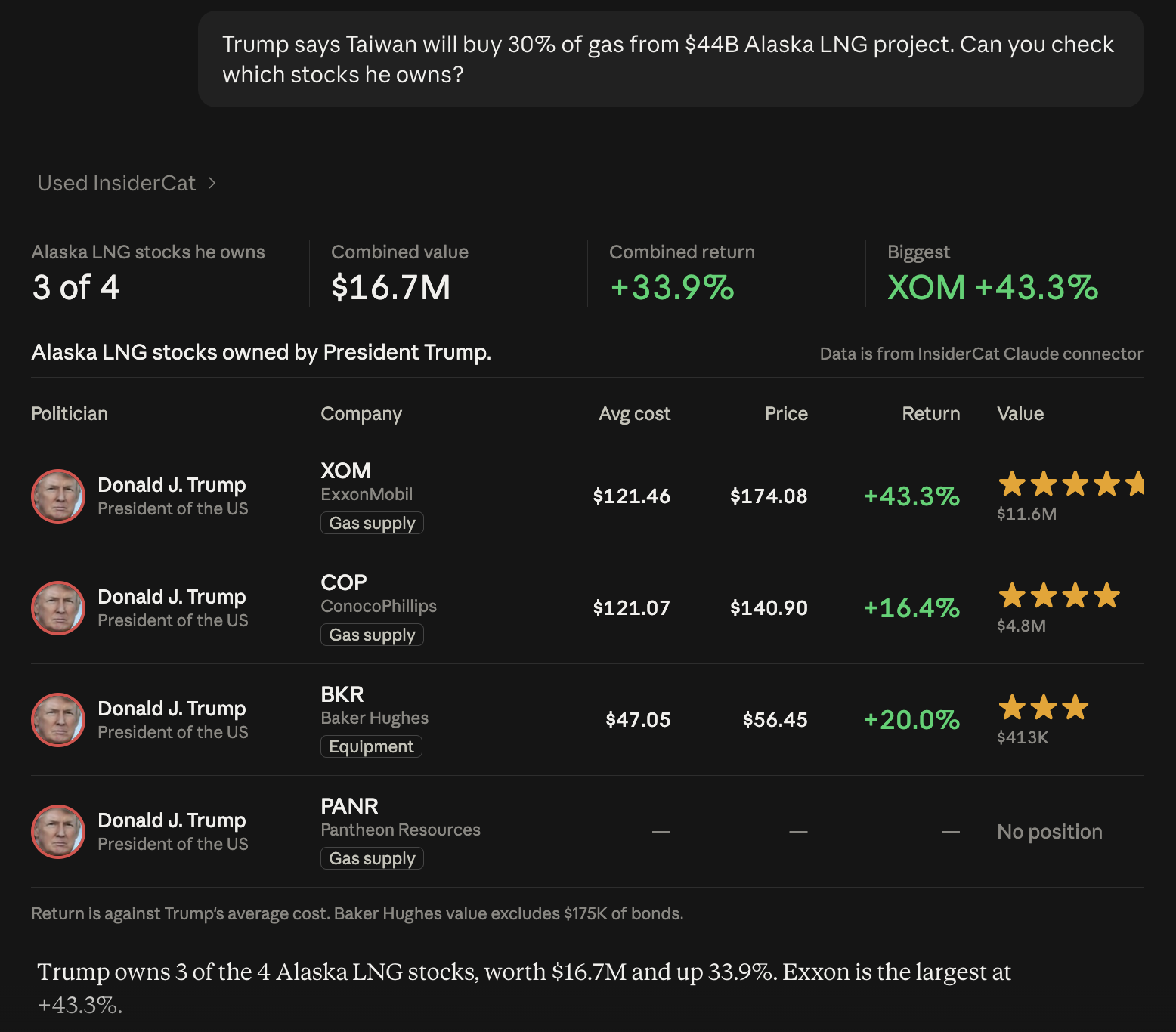
- Ask questions plainly: For example, "Find Trump's big buys in his last disclosure that haven't moved much." Claude pulls the data from Trump's live portfolio and builds the table for you.
- Check a news story: For example, "Saw news on Trump owning stock in pharma companies with price exemptions. What's up there?" Claude looks up who holds the companies in the story.
- Get hourly news alerts: Claude supports scheduled tasks, so it can scan the news every hour and analyze the related holdings of Trump, the U.S. government and members of Congress automatically. The prompt is below.
3/3: The prompt and helpful tips
- For questions, you don't need a prompt. Ask plainly, like in the screenshot above.
- For the hourly tracker, create a scheduled task in Claude with the details below.
- Pro tip: If you send the prompt from your phone, the visuals automatically come out mobile-friendly.
- Format tables your way: Send Claude a visual you liked and tell it to "format tables like this."
Task name: Trump & Congress news tracker
Schedule: Every hour. Use the prompt below as-is.
Prompt:
Find market-moving news covering government actions, tariffs, contracts, Trump posts and anything else with a Trump & stocks angle from the last 24h. From sources like Reuters, AP, Bloomberg, CNBC, WSJ.
Use the InsiderCat connector for political & corporate insider trading data. For each news story, show: The title, brief description, US Government positions, Trump & Congress positions. Show positions in tables. If related, also mention Trump mentions & corporate sponsorship relations. Congress member committee overlaps are also important and useful.
Format tables properly. Show total returns not daily returns.
Keep it brief for each headline. You can go deeper if asked.
The prompt asks for Trump mentions and corporate sponsor relationships because a stock that shows up in several of these datasets has more than one documented Trump connection. Our guide to Trump market overlaps explains how to read them.
FAQ
Do I need to be technical to set this up?
No. You add the InsiderCat connector to Claude with one click, then paste the prompt into a scheduled task. Neither step needs code or an API key.
Does the hourly task run when my computer is off?
Scheduled tasks that only use connectors run in the cloud, so they keep running when your computer is asleep or the Claude app is closed.
Does it work with ChatGPT, Perplexity or Grok?
Yes. The InsiderCat MCP server works with any assistant that supports remote MCP connectors. The setup guide has steps for each one. Scheduling features vary by assistant.
Where does the data come from?
From public sources: congressional disclosures, Trump's OGE filings, SEC Form 4 filings for corporate insiders, and official announcements for U.S. government stakes. InsiderCat turns them into live portfolios and returns, which the connector serves to Claude.